Page 1 of 4 1234 LastLast
Results 1 to 10 of 38

Thread: LaserWave + Scanpro issue

  1. #1
    Join Date
    Jan 2009
    Location
    Buffalo, NY
    Posts
    65

    Question LaserWave + Scanpro issue

    Hi Guys,
    Yesterday I got to play with my new lab module, a ~100mw greenie from LaserWave (thanks Marc and Bridge!). It looks great, very bright, solid design, etc .

    Here's my problem... I can't seem to get analog modulation working with my scanpro20's. I set it to the correct analog mode (believe me I've tried them all) and tested it by applying +5v from a bench psu. I also tested the analog signal from the scanpros by using another analog laser i have (flexmod driver) and it works fine. Multimeter shows varying voltages when the show is running but the current is very low. Could the current be too low for the laser driver to pick it up?

    Thanks!
    P.S. I know everyone here loves pictures so I'll take some pics when I get this up and running

  2. #2
    Join Date
    Jul 2008
    Location
    Maryland
    Posts
    1,691

    Default

    invert your modulation signal..
    Quis custodiet ipsos custodies?
    Solid State Builders Group

  3. #3
    Join Date
    Jan 2009
    Location
    Buffalo, NY
    Posts
    65

    Default

    Quote Originally Posted by keeperx View Post
    invert your modulation signal..
    tried that...

  4. #4
    Join Date
    Jul 2008
    Location
    Austin, TX
    Posts
    26

    Default

    Quote Originally Posted by mrblack927 View Post
    Here's my problem... I can't seem to get analog modulation working with my scanpro20's. I set it to the correct analog mode (believe me I've tried them all) and tested it by applying +5v from a bench psu. I also tested the analog signal from the scanpros by using another analog laser i have (flexmod driver) and it works fine. Multimeter shows varying voltages when the show is running but the current is very low. Could the current be too low for the laser driver to pick it up?
    So are you using the scanpro's program board or a separate DAC? The ScanPro program board only does TTL modulation.

    Does the laser light up when you apply +5v to the modulation input?

  5. #5
    Join Date
    Jul 2008
    Location
    Maryland
    Posts
    1,691

    Default

    get a 5v source and a pot and see if you can modulate it manually...

    put the pot on the positive side..
    Quis custodiet ipsos custodies?
    Solid State Builders Group

  6. #6
    Join Date
    Jan 2009
    Location
    Buffalo, NY
    Posts
    65

    Default

    Quote Originally Posted by keeperx View Post
    get a 5v source and a pot and see if you can modulate it manually...

    put the pot on the positive side..
    Alright, I did that, and the laser does fade out and die very quickly as I turn the pot. Maybe the voltage isn't getting high enough from the scanpro's.

    But even then, the laser should still be ON... just dimmer. I just realized this is happening with my red module as well. I don't know what to do.

  7. #7
    Join Date
    Nov 2005
    Location
    Melbourne, Australia
    Posts
    3,702

    Default

    I think you will find the problem is the processor on the program board cannot source enough current to allow the laser to modulate properly. kinda sucks, but remember the program board as really designed to work with a particular type of TTL laser.

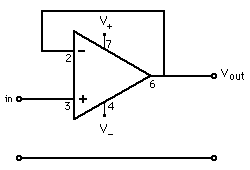
    A solution that comes to mind would be to buffer the color outs with a opamp such as a 741 wired as a voltage follower.

    KVANT Australian projector sales
    https://www.facebook.com/kvantaus/

    Lasershowparts- Laser Parts at great prices
    https://www.facebook.com/lasershowparts/

  8. #8
    Join Date
    Jul 2006
    Location
    Connecticut, USA
    Posts
    2,478

    Default

    hey kyle-

    did you see the post above, that board that comes with the scan pros is just TTL ouputs. (dave, correct me if im wrong on that!?!?) i do believe that is the case though.

    therefore you will either have "laser on" or "laser off". no in between. also, that board has a current issue as dave said. therefore, it probably isnt supplyiing enough current to power the lasers.

    hook your bench PS to the input on the lasers (as i do when i test them like on the data sheet i provided you). vary your Vin from 0V - 5V. This obviously will tell you if the board can source the current you need.

    let us know how u make out! daves circuit could work for ya too.

    -Marc
    http://www.laserist.org/images/ildalogos/ILDA-logo_colored-beams_Corporate_150w.jpg

    ILDA- U.S. Laser Regulatory Committee

    Authorized Dealer for:

    • Pangolin Laser Software and Hardware
    • KVANT Laser Modules & Laser Systems
    • X-Laser USA
    • CNI Lasers
    • Cambridge Technology & Eye Magic Professional Scanning Systems

    FDA/CDRH Certified Professional LuminanceRGB Laser Light Show Systems


  9. #9
    Join Date
    Jan 2009
    Location
    Buffalo, NY
    Posts
    65

    Default

    Dave: thanks for the advice, any idea where I can get one of those components? Weird thing is it worked for like 2 minutes when I first tried it and then never again (with the red, at least). It must be just under the current required to run the laser.

    Marc: I dont fault you (or your company) for this. I've tested your lasers with a bench PSU and the analog mod works fine. I'm sure I will figure a way to get them working in my projector.

    I'll keep you posted!

  10. #10
    Join Date
    Nov 2005
    Location
    Melbourne, Australia
    Posts
    3,702

    Default

    Quote Originally Posted by mrblack927 View Post
    Dave: thanks for the advice, any idea where I can get one of those components? Weird thing is it worked for like 2 minutes when I first tried it and then never again (with the red, at least). It must be just under the current required to run the laser.
    !
    Most electronics type store should stock a 741 op amp..
    KVANT Australian projector sales
    https://www.facebook.com/kvantaus/

    Lasershowparts- Laser Parts at great prices
    https://www.facebook.com/lasershowparts/

Posting Permissions

  • You may not post new threads
  • You may not post replies
  • You may not post attachments
  • You may not edit your posts
  •